
Every clinical database used for a regulatory submission depends on one assumption: the software performed as intended. Computer system validation for clinical trial software provides the documented evidence needed to prove that assumption.
Validation has become more challenging as clinical trials have grown more complex. Today’s studies span multiple countries, involve more data sources, and rely on an increasing number of connected applications. Electronic Data Capture (EDC), Clinical Trial Management Systems (CTMS), patient-facing applications, imaging platforms, and payment systems all create or manage regulated records. Each adds to the validation scope.
As a result, computer system validation is no longer a one-time activity completed before study startup. It is a lifecycle process that spans requirements, design, risk assessment, testing, release, and change control. Sponsors, CROs, quality teams, and technology vendors all contribute to maintaining a validated state.
A structured validation framework makes this complexity easier to manage. Modern software development practices combine GAMP 5 principles, documented risk management, objective test evidence, and controlled change management to maintain validation throughout the software lifecycle. Platforms designed for regulated clinical research can also help generate validation evidence as part of normal development and study operations rather than reconstructing it before an inspection.
This article explains which clinical systems require validation, the core components of the validation lifecycle, how risk-based validation is shaping current practice, and how Medigen Suite supports sponsors and CROs with validated clinical trial software.
Why Validation Matters
Computer system validation is more than a regulatory requirement. It provides documented evidence that a computerized system consistently performs according to its intended use and predefined specifications. That evidence underpins the integrity, reliability, and traceability of clinical trial data.
Regulations including FDA 21 CFR Part 11, EU Annex 11, and ICH GCP require computerized systems used in clinical trials to be validated. Without documented validation, organizations cannot demonstrate that electronic records are reliable, complete, or suitable for their intended purpose.
Validation becomes especially important as studies approach database lock and regulatory inspection. Findings related to audit trails, user access controls, system changes, or incomplete qualification records can require significant remediation. Maintaining validation evidence throughout the study lifecycle is generally more efficient than recreating it at the end and provides a stronger foundation for inspection readiness.
Which Systems Fall Within the Validation Perimeter
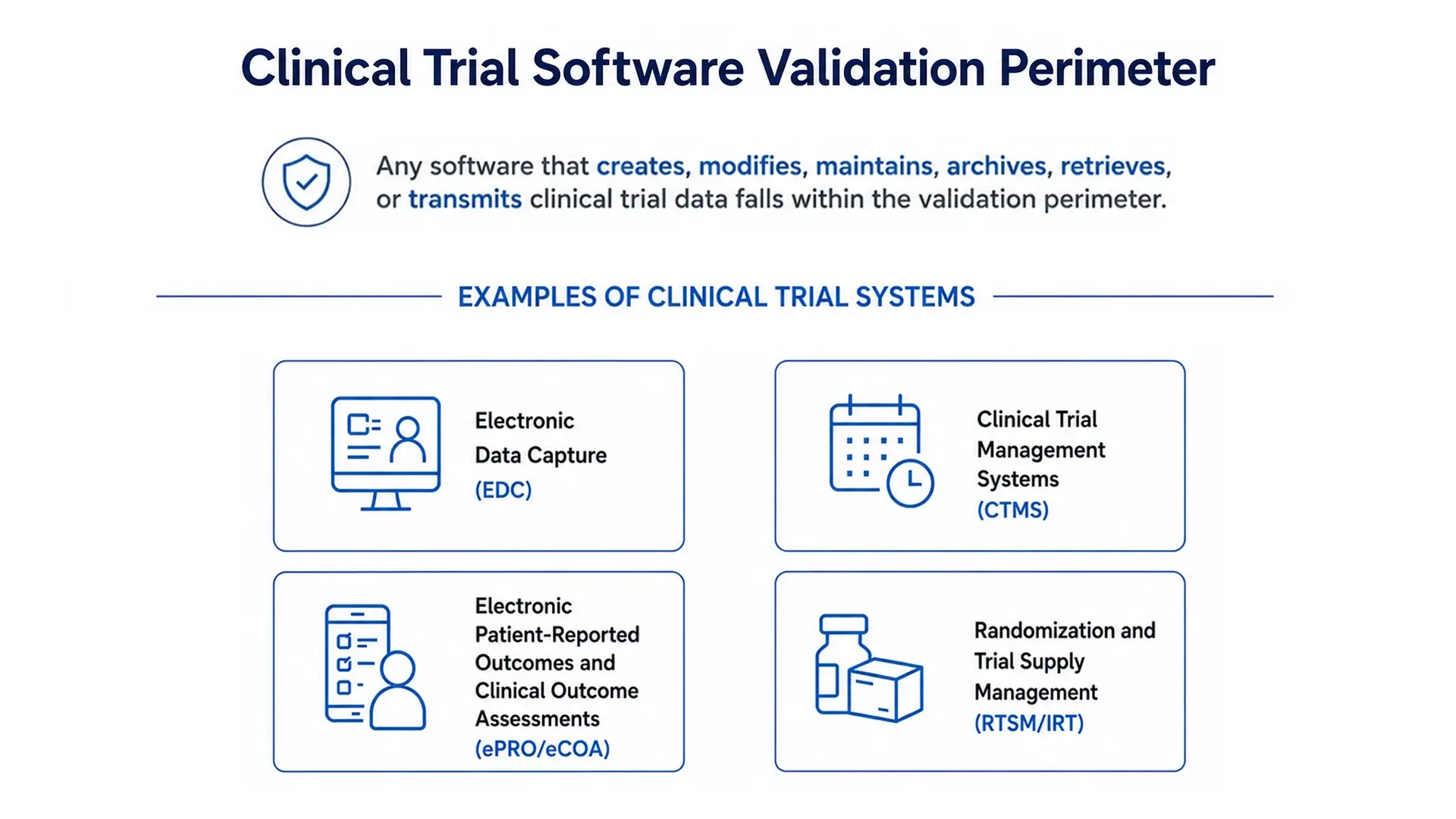
Any software that creates, modifies, maintains, archives, retrieves, or transmits clinical trial data falls within the validation perimeter. In practice, this includes four core categories:
- Electronic Data Capture (EDC): Platforms where sites enter patient data into electronic case report forms (eCRFs).
- Clinical Trial Management Systems (CTMS): Systems that manage study milestones, monitoring visits, site activities, and operational oversight.
- Electronic Patient-Reported Outcomes and Clinical Outcome Assessments (ePRO/eCOA): Applications that allow patients or clinicians to record symptoms, questionnaires, and compliance.
- Randomization and Trial Supply Management (RTSM/IRT): Systems that manage treatment randomization and clinical supply logistics.
The validation perimeter often extends beyond these core systems. Data validation modules, reporting tools, safety adjudication workflows, Core Lab imaging platforms, eConsent, eTMF, and other integrated applications also create, process, or manage regulated data. These systems should be included in the system inventory and validation plan because they contribute to the integrity of clinical trial records.
The Core Components of the Validation Lifecycle
Computer system validation follows a structured lifecycle that demonstrates a system performs according to its intended use. Most organizations apply the V-Model described in GAMP 5, linking user requirements, system design, testing, and qualification through documented objective evidence. Increasingly, these activities are managed within Agile development lifecycles while maintaining the same validation principles.
| Component | Purpose | Typical owner |
| Validation Master Plan (VMP) | Defines the validation strategy, scope, responsibilities, and timelines | Sponsor or CRO quality function |
| User Requirements Specification (URS) | Defines what the software must do from the end-user perspective | Sponsor, with study team input |
| Risk Assessment | Identifies functions that could affect patient safety or data integrity | Shared sponsor and vendor activity |
| Installation Qualification (IQ) | Confirms the software is correctly installed in the target environment | Vendor, evidenced to the sponsor |
| Operational Qualification (OQ) | Verifies the software performs according to functional specifications | Vendor, with sponsor review |
| Performance Qualification (PQ) | Confirms the system performs under real clinical workflows | Sponsor or CRO, study specific |
| Traceability Matrix (TM) | Maps each requirement to its specification and corresponding test evidence | Sponsor, using vendor documentation |
| Validation Summary Report (VSR) | Summarizes validation activities and confirms the system is fit for its intended use | Sponsor quality function |
Although validation documents vary between organizations, the objective remains the same: every requirement should be supported by documented evidence demonstrating that it has been implemented, tested, and approved.
The Traceability Matrix plays a central role by linking requirements to test results, making it easier to demonstrate validation completeness during audits and regulatory inspections.
Risk-Based Assurance and the Evolution of CSV
Traditional Computer System Validation (CSV) has often been criticized for producing more documentation than the level of testing justifies. Today, regulators encourage a risk-based approach that focuses validation effort where it has the greatest impact on patient safety, data integrity, and product quality.
Modern validation combines GAMP 5 principles with Agile software development practices. Requirements are documented, risks are assessed, functionality is verified, and objective test evidence is collected throughout the software development lifecycle. This approach helps maintain a validated state while supporting continuous development and controlled change management.
One distinction is important. FDA’s Computer Software Assurance (CSA) guidance applies to software used in medical device production and quality management systems, not to clinical trial data systems. For clinical investigations, the FDA’s October 2024 guidance on electronic systems, electronic records, and electronic signatures describes a risk-based approach to validation. It encourages validation activities that are proportionate to risk while allowing appropriate reliance on vendor qualification evidence. Although CSA has influenced industry thinking, it should not be treated as the governing framework for validating EDC, CTMS, or other clinical trial systems.
Within modern software development, risk assessments are often performed at feature level. Features are evaluated according to the probability and severity of potential failure, allowing testing effort to be directed where it provides the greatest value. Higher-risk functionality receives more rigorous qualification, while lower-risk features can often rely more heavily on documented vendor evidence.
| Feature risk level | Examples | Testing approach | Vendor evidence |
| High | Electronic signatures, audit trails, randomization logic, edit checks affecting eligibility | Fully scripted and documented | Supplements sponsor testing |
| Medium | Query workflows, role and privilege configuration, data exports | Scripted or hybrid, based on risk | Frequently leveraged |
| Low | Dashboard metrics, report layouts, interface preferences | Unscripted or exploratory | Often relied upon directly |
A documented risk assessment helps determine where validation effort should be focused. Vendor qualification evidence, including Validation Plans, Test Plans, IQ, OQ, PQ documentation, Test Summary Reports, and Validation Reports, can significantly reduce sponsor qualification effort while providing documented objective evidence for regulatory inspection. Sponsors remain responsible for validating study-specific configuration and confirming that the system performs as intended within the planned clinical trial.
How Medigen Suite Supports Computer System Validation
Validation is easier to manage when the platform and development process are built around it. Across Catchtrial EDC+ and Maptrial CTMS+, Medigen Suite follows documented study development and validation procedures based on risk management, objective test evidence, and GAMP 5 validation principles.
Study configuration begins with sponsor requirements, including the protocol, annotated CRFs, edit check specifications, user roles, randomization requirements, and any study-specific workflows. These requirements are reviewed, documented, and translated into study-specific configurations before validation begins.
Development and validation are managed through an Agile lifecycle with documented requirements, risk assessments, code reviews, qualification activities, and release records. Validation evidence is maintained throughout development rather than assembled only at the end of a project.
Additionally, validation is performed in dedicated qualification environments before release. Installation Qualification (IQ), Operational Qualification (OQ), and Performance Qualification (PQ) are executed using documented test plans, predefined acceptance criteria, and objective evidence. Preview environments support customer review and user acceptance testing before validated study configurations are promoted to production.
Meeting Part 11, Annex 11, and ICH GCP Expectations
A validated clinical trial system must consistently demonstrate four core capabilities: time-stamped audit trails, secure electronic signatures, role-based access controls, and documented backup and recovery procedures that protect regulated records throughout the system lifecycle.
The Medigen Suite validation process aligns software design, development, verification, and validation with documented user requirements and intended use. Qualification activities follow the GAMP 5 V-Model, with objective evidence collected throughout IQ, OQ, and PQ to demonstrate that the system performs as intended.
ICH E6(R3), FDA 21 CFR Part 11, and EU Annex 11 all emphasize data integrity, traceability, controlled access, and validated computerized systems. Catchtrial EDC+ and Maptrial CTMS+ include functionality designed to support these expectations through audit trails, controlled user privileges, study blinding, configurable validation rules, electronic signatures, and documented qualification processes. GDPR requirements also apply wherever personal data are processed.
Choosing the Right CSV Approach for Your Study
Successful validation starts with clear study requirements rather than documentation alone. Sponsors should define intended use, identify functions that could affect patient safety or data integrity, and determine where vendor evidence can appropriately complement study-specific qualification.
It is equally important to understand the vendor’s validation methodology, quality management system, change control process, and available validation documentation. These factors influence how much sponsor-side qualification is required and how efficiently validation evidence can be maintained throughout the study lifecycle.
To see how Catchtrial EDC+ and Maptrial CTMS+ support validated study development, audit trails, electronic signatures, and regulatory compliance, visit the product pages or request a demo from the Medigen Suite team.
Frequently Asked Questions
Is computer system validation required for clinical trial software?
Yes. Any system that creates, modifies, maintains, archives, retrieves, or transmits records supporting FDA submissions falls under 21 CFR Part 11. In the EU, clinical trials are also subject to Annex 11. Validation provides the documented evidence that these requirements have been met.
Does FDA’s CSA guidance replace CSV for EDC systems?
No. FDA’s Computer Software Assurance (CSA) guidance applies to software used in medical device production and quality management systems. For clinical investigations, risk-based validation expectations are set out in the FDA guidance on electronic systems, electronic records, and electronic signatures, together with ICH GCP.
Can sponsors rely on a vendor’s validation package?
Vendor IQ and OQ evidence can be leveraged, and regulators encourage proportionate reliance on vendor documentation. However, study-specific configuration, including edit checks, user roles, and randomization setup, generally still requires sponsor-side Performance Qualification (PQ) or user acceptance testing.
How often should a validated system be revalidated?
Revalidation should be driven by risk rather than a fixed schedule. Platform upgrades, configuration changes, protocol amendments, and integration changes should each trigger a change control assessment to determine the scope of regression testing.
What do inspectors typically request first?
Inspectors commonly request the system inventory, Validation Summary Report (VSR), Traceability Matrix (TM), audit trail extracts, and user access records showing which users held which privileges during the study.
Primary Regulatory Sources
- 21 CFR Part 11, Electronic Records; Electronic Signatures
- FDA, Electronic Systems, Electronic Records, and Electronic Signatures in Clinical Investigations: Questions and Answers, Final Guidance, October 2024, docket FDA-2017-D-1105 European Medicines Agency
- FDA, Part 11, Electronic Records; Electronic Signatures, Scope and Application, Final Guidance, August 2003
- FDA, Computer Software Assurance for Production and Quality Management System Software, Final Guidance, February 2026, superseding the final guidance issued 24 September 2025 Federal Register
- ICH E6(R3), Guideline for Good Clinical Practice, Final Guideline, effective 23 July 2025
- EMA, Guideline on Computerised Systems and Electronic Data in Clinical Trials
- EudraLex Volume 4, Annex 11, Computerised Systems
- Regulation (EU) 2016/679 (GDPR)
Table of Contents
Latest Articles
21 CFR Part 11 password requirements: what the regulation actually says
A 90-day password change is not a 21 CFR [...]

Clinical trial software for the connected study stack
Clinical trials are generating more data from more sources, [...]

A practical guide to the main types of clinical trials
The type of clinical trial you run shapes almost [...]
This article provides general information and does not constitute regulatory, legal, clinical, or compliance advice. Requirements and appropriate processes may vary by study, product, jurisdiction, and organization. Medigen Suite functionality should be used in accordance with applicable regulations, study documentation, and internal procedures.